OpenClaw Self-Hosted vs Managed: The True Cost Comparison
Disclosure: We run Clawer.ai, a managed OpenClaw hosting provider. We're doing this math honestly because we'd rather you choose correctly and tell your friends than pick managed hosting for the wrong reasons and resent us. If you should self-host, we'll tell you that.
The most common mistake people make with OpenClaw is comparing the VPS bill to the managed hosting bill and thinking that's the cost comparison. A €3.79/month Hetzner server is obviously cheaper than a $49/month managed plan. Except it isn't, once you account for everything.
This post does the full math across four realistic user scenarios — casual user, daily driver, power user, and small team — with real numbers from real deployments.
What "Self-Hosting OpenClaw" Actually Means
The OpenClaw quick-start guide makes self-hosting look straightforward. You pull a Docker image, drop in a config file, and run it. That gets you a working instance in about 15 minutes. It also gets you an instance binding to all network interfaces with no authentication — visible to every port scanner on the internet within hours. The 42,000+ exposed instances we found aren't there because people are reckless. They're there because the gap between "running" and "production-ready" is 4-8 hours most tutorials don't cover.
A production-ready self-hosted OpenClaw deployment requires:
The Self-Hosting Checklist
Infrastructure (1-2 hrs)
- ✓ VPS provisioned, DNS configured
- ✓ SSH key auth, password auth disabled
- ✓ Docker + Docker Compose installed
- ✓ Nginx or Caddy for reverse proxy + TLS
OpenClaw Config (30-60 min)
- ✓ gateway.yml configured and locked down
- ✓ AI model API keys wired in
- ✓ Messaging channels (Telegram, WhatsApp, Slack)
- ✓ Docker Compose with restart policies
Security Hardening (4-8 hrs)
- ✓ Gateway bound to loopback only (not 0.0.0.0)
- ✓ Token auth enabled with random secret
- ✓ UFW/iptables: deny-all inbound, allowlist ports
- ✓ Docker: resource limits, dropped capabilities
- ✓ Secrets out of .env files and into a vault
- ✓ Fail2ban or equivalent
Ongoing (5-10 hrs/mo)
- ✓ CVE monitoring and patch application
- ✓ Automated backups configured and tested
- ✓ Log rotation (Docker logs fill disks quietly)
- ✓ Uptime monitoring + alerting
- ✓ WhatsApp session re-auth when it drops
If you've done all of this before, it's a half-day of work to get set up plus a few hours per month to maintain. If you're learning as you go, add 40-60% to those estimates. The point isn't to discourage self-hosting — it's to make sure you're pricing it honestly.
The True Cost of OpenClaw Self-Hosting vs Managed
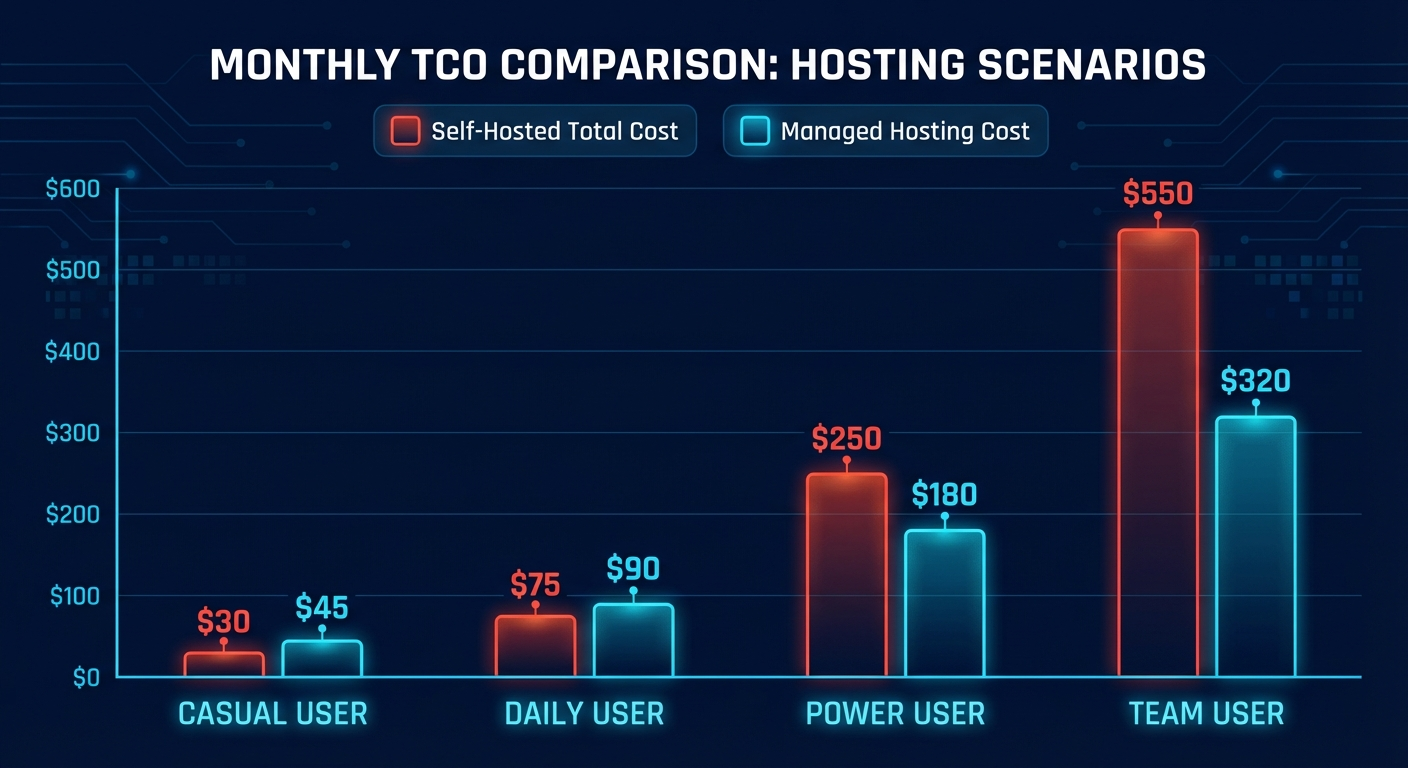
Most cost comparisons stop at the server bill. Here's the full picture across four scenarios. We've used conservative maintenance time estimates — real users often spend more, especially in the first 3 months.
Assumptions: Self-host on Hetzner CX22 (€3.79/mo ≈ $4/mo). API costs based on moderate Claude usage. Hourly rate $50 (conservative knowledge worker estimate). Managed = Clawer Pro ($49/mo, models included) or xCloud ($24/mo + API costs).
Scenario 1: The Casual User (50-100 messages/day)
| Cost Category | Self-Hosted (Hetzner) | Clawer Managed | xCloud + BYOK |
|---|---|---|---|
| Server / hosting | $4/mo | $49/mo | $24/mo |
| AI model API costs | $15/mo | Included | $15/mo |
| Maintenance (3 hrs × $50) | $150/mo | $0 | $0 |
| Setup amortized over 12 months | $21/mo | $0 | $0 |
| True monthly TCO | $190/mo | $49/mo | $39/mo |
Verdict for casual users: Managed wins by a wide margin. At 50-100 messages/day, you're not even testing the limits of what a shared managed instance handles trivially. The 3 hours of maintenance per month for a self-hosted setup at this usage level is painful overhead for no meaningful benefit.
Exception: If you genuinely enjoy infrastructure work and would spend that time anyway, subtract the maintenance cost from self-hosted. It's still more expensive on server + API alone ($49/mo for Clawer, $19/mo vs $39/mo for xCloud), but the gap narrows to something reasonable.
Scenario 2: The Daily Driver (500-1,000 messages/day)
| Cost Category | Self-Hosted (Hetzner CX32) | Clawer Managed | xCloud + BYOK |
|---|---|---|---|
| Server / hosting | $9/mo | $49/mo | $24/mo |
| AI model API costs | $55/mo | Included | $55/mo |
| Maintenance (6 hrs × $50) | $300/mo | $0 | $0 |
| Setup amortized over 12 months | $33/mo | $0 | $0 |
| True monthly TCO | $397/mo | $49/mo | $79/mo |
Verdict: This is where the gap becomes genuinely startling. At 500-1,000 messages/day, API costs alone nearly match a managed plan — and self-hosting adds $300+/month in time overhead. If you value your time even minimally, this math isn't close. xCloud at $79/mo effective becomes competitive if you already have API keys and enjoy running infrastructure.
Scenario 3: The Power User Running Local Models
This is the scenario where self-hosting actually wins on cash cost. If you run Ollama with a capable local model (Llama 3 70B, Mistral 7B, or similar) instead of cloud APIs, you eliminate the API cost line entirely. The tradeoff is model quality and response speed — local 7B models aren't Claude. But for many workflows, they're good enough.
| Setup | Cash Cost/mo | Time Cost/mo | Model Quality |
|---|---|---|---|
| Contabo VPS (8GB RAM) + Ollama Llama 3 8B | €4.50/mo | 8-12 hrs/mo | Good (7B) |
| Oracle Cloud Free + Ollama Llama 3 8B | $0/mo | 10-15 hrs/mo | Good (7B) |
| Home server (existing hardware) + Ollama | ~$10/mo electricity | 10-15 hrs/mo | Excellent (70B+) |
| Clawer Managed (Claude + GPT-4o) | $49/mo | 0 hrs/mo | Excellent (frontier) |
The Oracle Cloud + Ollama path is genuinely compelling if you're comfortable with Linux and have the patience for setup. Free forever, 4 ARM CPUs, 24GB RAM — plenty of headroom for a 7B model running alongside OpenClaw. The Cognio Labs guide walks through this setup end-to-end.
The honest caveat: if your time is worth $50/hour and you're spending 12 hours/month maintaining it, you're paying $600/month in hidden labor for free hosting. The math only works if you enjoy the work or are building skills that have value elsewhere.
Scenario 4: The Small Team (3-5 users)
| Cost Category | Self-Hosted (DigitalOcean) | Managed (Clawer) × 4 | xCloud Business |
|---|---|---|---|
| Server / hosting | $32/mo (4 vCPU, 8GB) | $196/mo | $149/mo |
| AI model API costs | $120/mo | Included | $120/mo |
| Admin/maintenance (10 hrs × $80) | $800/mo | $0 | $0 |
| Multi-user setup complexity | +$200 (setup) | Included | Included |
| True monthly TCO | $952+/mo | $196/mo | $269/mo |
Teams almost always benefit from managed hosting. Admin time at a team level runs higher because you're responsible for multiple users' data, uptime SLAs, and shared security. A single security incident that exposes team conversation logs is the kind of event that ends projects and damages trust in ways that are hard to quantify but very real.
What Actually Breaks When You Self-Host OpenClaw
Abstract risk lists don't help you decide. Here's what actually breaks, based on running OpenClaw infrastructure and reading through community incident reports on the OpenClaw Discord and r/selfhosted.
1. WhatsApp Sessions Drop Silently
WhatsApp's unofficial API (Baileys, which OpenClaw uses) is not officially supported by Meta. The session token expires unpredictably — sometimes after days, sometimes weeks. When it does, your assistant goes silent with no notification unless you've set up monitoring specifically for this. You find out when you message it and don't get a response.
Re-connecting requires SSH-ing into the server, restarting the WhatsApp channel, and scanning a QR code from your phone — which has a 20-second expiry. If you're not at your computer, you can't reconnect. This happens every 2-4 weeks for most users. Managed providers handle re-authentication through a dashboard flow, or they maintain session health proactively.
2. Memory Exhaustion Under Load
OpenClaw's memory footprint is well-behaved at rest but grows significantly when processing concurrent requests, running browser automation skills, or managing multiple active agent sessions. A 4GB Hetzner CX22 that runs fine under normal load can OOM-kill the process under heavier usage. Without Docker resource limits (--memory=3g --memory-swap=3g) and a proper restart policy, the container dies and stays dead until you notice.
The fix is straightforward once you know about it, but it's not in the quick-start guide. Most people hit this in month 2-3 when their usage patterns settle in.
3. Docker Log Accumulation Fills the Disk
OpenClaw is chatty. The default Docker logging configuration writes unbounded JSON logs to /var/lib/docker/containers/*/. A moderately active instance can fill a 40GB disk in 3-4 months. The disk fills silently, the container crashes, and you SSH in to find a full filesystem. Setting --log-opt max-size=50m --log-opt max-file=3 in your Docker Compose or daemon config prevents this entirely, but it's another thing you have to know to configure.
4. CVE Patches You Miss
CVE-2026-25253 (CVSS 8.8, one-click RCE via malformed share links) was disclosed on February 3rd. The patch was available same-day. Three weeks later, the majority of self-hosted instances had not applied it. Not because the operators were negligent — because tracking CVEs for every piece of software you run requires active monitoring that most individuals don't maintain.
If you don't subscribe to security feeds for OpenClaw, Docker, and your OS, you won't hear about patches until someone on Reddit mentions it. By then, you've been vulnerable for weeks. Managed providers push patches fleet-wide within hours of disclosure.
5. Skill Permissions Are Broader Than You Think
OpenClaw skills run with the permissions of the Docker container — which, by default, has broad filesystem access and network access. A compromised skill (or a malicious one from ClawHub — roughly 12% of which were infected during the ClawHavoc campaign) can read your config files, environment variables, and API keys. On a managed platform, skills run in isolated sandboxes. On a self-hosted instance, a malicious skill has a path to everything on the container.
The mitigation is Docker capability dropping, read-only filesystems, and aggressive network segmentation. It's doable, but it's another 2-3 hours of hardening most tutorials skip. For a complete security setup guide, see our OpenClaw security hardening guide.
Self-Host or Managed: A Framework That Actually Decides
Most comparison articles end with "it depends on your needs." That's not useful. Here's a framework that actually produces an answer. Answer these five questions:
1. Can you write a working Docker Compose file from memory?
Not "can you Google it and follow a tutorial." Can you write one from scratch and debug it when it doesn't work? If no → managed.
2. Does the maintenance feel like work or like play?
If debugging a failed restart at 11pm sounds annoying → managed. If it sounds kind of interesting → self-host.
3. Do you need features only self-hosting offers?
Full data sovereignty, custom network policies, local AI models, or heavily modified OpenClaw forks. If yes to any → self-host. If no → managed.
4. Do you have an existing API key relationship with OpenAI/Anthropic?
Already paying for API access → self-host becomes more attractive (the cost differential shrinks significantly). Starting fresh → managed is simpler.
5. Is WhatsApp your primary channel?
WhatsApp is the most painful channel to self-configure and maintain. Telegram is easy. If you primarily want WhatsApp → managed saves significant friction.
| Your profile | Recommendation | Starting point |
|---|---|---|
| Non-technical, just want it to work | Managed | Clawer free tier → |
| Technical, has API keys, wants control | Self-host | Hetzner CX22 + Docker |
| Semi-technical, wants cheap but easy | Self-host (assisted) | Hostinger 1-click template |
| Free is the requirement, not a preference | Self-host (local models) | Oracle Cloud + Ollama |
| Team of 3-10 people | Managed | Clawer Pro or xCloud Business |
| Enterprise, AWS-native, compliance reqs | Managed (AWS) | OpenClaw AWS Hosting |
| Home lab enthusiast, 70B models | Self-host (home server) | Local hardware + Ollama |
The Honest Verdict
Self-hosting OpenClaw makes sense for a specific type of person: technically comfortable, genuinely interested in the infrastructure, and either running local models or already paying for API access. For that person, self-hosting on Hetzner is a satisfying project that costs $10-20/month in cash.
For everyone else — which is most people — the math doesn't work unless you treat your time as free. The VPS bill is cheaper. The total cost of ownership usually isn't.
Most non-technical users who try self-hosting switch to managed within 3 months. Not because they couldn't figure it out — because they got the assistant working, had an outage, spent a Saturday fixing it, and decided they'd rather just have it work reliably. That's a completely rational conclusion.
We're Clawer, and we obviously prefer you use managed hosting. But we'd rather you self-host and love OpenClaw than use managed hosting and resent the cost. The project is better when more people are using it, regardless of how they're running it. If you do self-host, the community on Discord and r/selfhosted is genuinely helpful, and the OpenClaw documentation has improved significantly over the past three months.
Not sure which path fits you?
Start with Clawer's free tier — 100 total messages, no credit card. If you find yourself wanting more control, you can always export your config and move to self-hosted. No lock-in.
Try free — 60 seconds to setup →For a full breakdown of managed hosting options, see our best OpenClaw hosting providers comparison. For the self-hosted path with full security hardening, see the OpenClaw security hardening guide.
Frequently Asked Questions
Is self-hosting OpenClaw actually cheaper than managed hosting?▼
The VPS bill is cheaper ($4-12/mo vs $24-49/mo). Total cost of ownership usually isn't. Once you add AI model API costs ($20-80/mo) and maintenance time valued at your hourly rate, most self-hosted deployments cost $190-600/month in true TCO. Self-hosting wins on cash cost only if you're running local models and genuinely enjoy the maintenance work.
How long does OpenClaw self-hosted setup actually take?▼
Getting it running: 15-60 minutes. Getting it production-ready: 6-12 hours for a first timer. The gap is security hardening — locking down the gateway binding, enabling auth, configuring firewalls, setting up Docker resource limits, and establishing a patch process. Managed providers like Clawer handle this in 60 seconds.
What breaks most often in self-hosted OpenClaw?▼
In order of frequency: (1) WhatsApp session drops requiring QR re-scan. (2) Memory exhaustion under load without Docker resource limits. (3) Disk filling with Docker logs. (4) Missed security patches for CVEs. (5) Skill permission abuse via ClawHub malware. None are catastrophic, but they require your attention and usually happen at inconvenient times.
Can I switch from self-hosted to managed later?▼
Yes — OpenClaw configuration (SOUL.md, AGENTS.md, MEMORY.md, skills) is portable. You export your workspace, create a managed account, and import your config. The main friction is reconfiguring messaging channels (especially WhatsApp, which requires re-authentication regardless). Most managed providers also let you export and leave, so there's no lock-in risk.
Is OpenClaw self-hosted vs managed better for privacy?▼
Self-hosted wins on data sovereignty — your conversations and config never leave your infrastructure. Managed providers have access to your conversation data by necessity (they run your instance). Good managed providers like Clawer don't use your data for AI training and encrypt it at rest — but if data sovereignty is a hard requirement (HIPAA, enterprise compliance), self-host or use a provider who can demonstrate compliance certifications.
Last updated: February 18, 2026. TCO figures based on Hetzner CX22 pricing (€3.79/mo), Clawer Pro ($49/mo), and xCloud managed ($24/mo). API costs estimated from Claude Haiku (fast responses) + Claude Sonnet (complex tasks) at moderate daily usage. Verify current pricing with each provider.